Live
Comment & DM automation
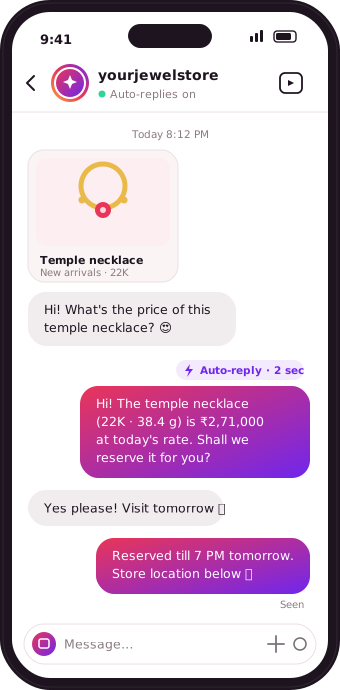
Set a keyword or reply to every comment on a post or reel — the moment someone asks about a piece, they get an instant reply in their DMs.
Auto-reply to Instagram comments, DMs, and story replies instantly — and send Meta-approved WhatsApp templates as broadcasts, single messages, or straight from your own systems via API.
Comments, DMs and story replies answered the moment they arrive — in your words, through Instagram's official API.
Set a keyword or reply to every comment on a post or reel — the moment someone asks about a piece, they get an instant reply in their DMs.
Turn every story reaction into a conversation automatically, without opening Instagram.
Quick-reply buttons greet new conversations, and keyword triggers answer common questions instantly — pricing, availability, store hours.
Set store hours once, and customers get an automatic reply outside them — so no one is left waiting until morning.
Broadcast to your whole list, message one customer, or trigger sends from your own systems — and only pay for what you send.
Send a Meta-approved template to your entire customer list in one broadcast — new arrivals, offers, or updates, out in one send.
Send an approved template to one customer at a time, for one-off updates that don't need a full broadcast.
Every approved template comes with its own API, so your developer can trigger individual WhatsApp messages directly from your own systems or website.
Every message sent is recorded against the customer and the exact date and time — a complete, searchable send history.
No flat monthly WhatsApp fee — you're billed only for the messages you actually send.
A closer look at everything Storemate Connect does on Instagram and WhatsApp.
Can't find your answer? Ask us directly — we'll walk you through it.
No. Storemate Connect uses Instagram's official API to send replies, the same access Meta provides to approved partners — no password sharing, no workarounds.
You write every message yourself, in your own words — Storemate Connect just sends it at the right moment. Nothing is generated automatically unless you choose to.
You can set a default reply for anything that doesn't match a keyword, so a customer always gets a response, and you can follow up personally later.
No. Storemate Connect connects through Instagram's and WhatsApp's official APIs, so your login credentials are never shared with us.
It’s live. Broadcasts and single messages using Meta-approved templates, the per-template developer API, and the full message log are all available now.
WhatsApp messaging on Storemate Connect is pay-per-use — you're billed for the messages you actually send, with no flat monthly fee for the WhatsApp side.
Yes. Every Meta-approved template gets its own API, so your developer can trigger individual WhatsApp messages programmatically from your own systems.
Connect your account and set up your first automation in minutes.